




With Alexa routines, you can automatically control multiple smart home devices using Amazon Alexa. Instead of giving every command separately, you create one routine that combines several actions and runs them automatically. This keeps things simple and helps your smart home work smoothly in the background.
Alexa routines are designed to automate smart home devices and Alexa features at specific moments, such as a voice command, a scheduled time, or an alarm. You decide when something should happen and what Alexa should do. This makes Alexa routines suitable for simple automations as well as more advanced everyday setups.
An Amazon Alexa routine is an automation you create in the Amazon Alexa app to connect smart home devices and Alexa features. With a routine, you tell Alexa to run multiple actions at once or in sequence, without having to trigger each action manually. You also choose when the routine starts, for example with a voice command, at a specific time, or using an alarm.
You can create up to 200 Alexa routines within one Amazon account. This makes it easy to set up different automations for certain times of day, recurring situations, or personal habits. You can edit, expand, pause, or remove routines at any time.
Example
With a fixed voice command, you can start multiple actions at once. When you say “Good morning”, Alexa can:
With Alexa routines, you can combine multiple actions into one automation. Alexa runs these actions automatically as part of the routine you set up.
Alexa routines can include actions such as:
By combining these options, you can tailor Alexa routines to match your daily habits and preferences.

To create an Alexa routine, you use the Amazon Alexa app. Before you start, make sure the smart devices you want to use are compatible with Amazon Alexa. When buying smart home devices, always check whether they can connect to your smart home platform.
Once your devices are set up in the Amazon Alexa app, you can start creating your own Alexa routines. This lets you decide when Alexa should do something and which actions should happen automatically. Follow the steps below to create an Amazon Alexa routine.
Open the Amazon Alexa app and tap the plus (+) icon.
Select the option “Routine”.
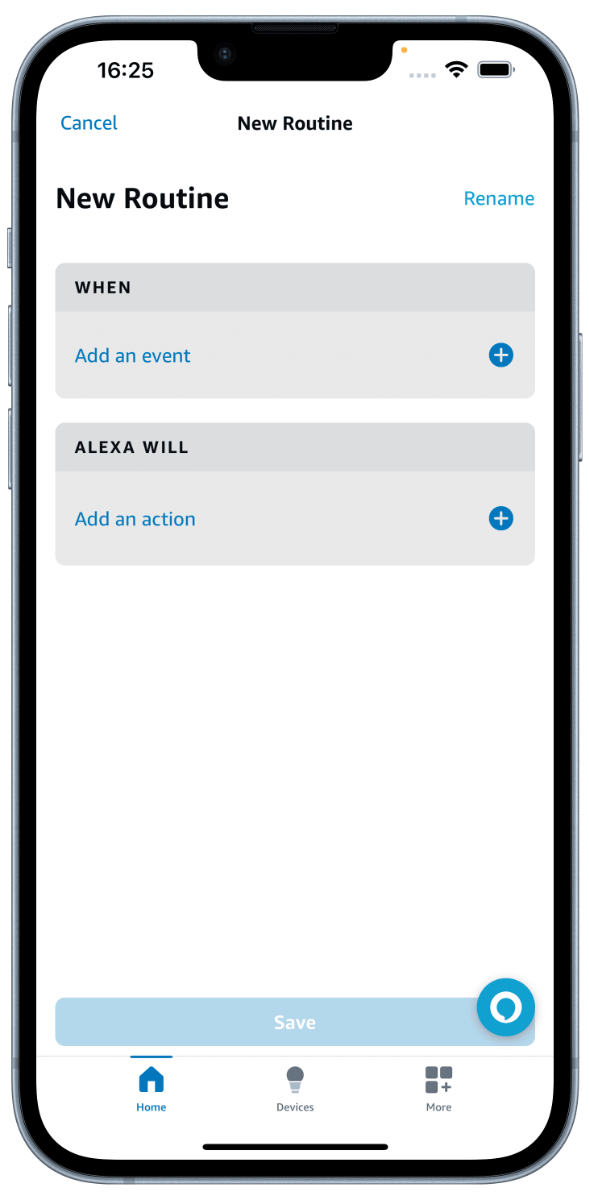
Tap “When this happens” to choose a time, voice command, or another trigger. Then tap “Alexa will” to add one or more actions. After choosing a trigger and at least one action, save the routine.
You can always edit routines later, or delete an Alexa routine if you no longer need it.
You can create up to 200 Alexa routines within one Amazon account.
Yes, Alexa routines can be edited, paused, or deleted at any time in the Amazon Alexa app.
Yes, a single Alexa routine can include multiple actions that run automatically in sequence.
Alexa routines work with smart devices and services that are compatible with Amazon Alexa.
If Alexa routines are not working, check whether your devices are connected, your routine is enabled, and the trigger is set correctly in the Amazon Alexa app.